Nav4AI
AllVideoKling 4.0 Online by CreateVision AI
Kling 4.0 Online by CreateVision AI

Kling 4.0 Online by CreateVision AI

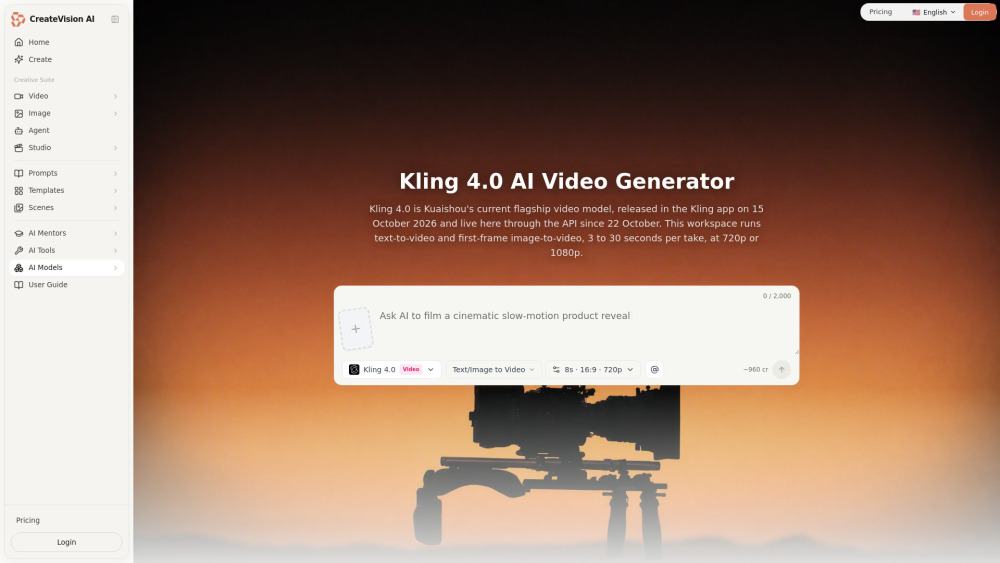
Kling 4.0 in the browser: 3–30 second video at 720p or 1080p from a prompt, keyframes, up to 15 references, or a clip you want edited. Stereo audio on every clip, per-second credits shown before you generate and refunded on failure.

Kling 4.0 Online by CreateVision AI screenshot

Reviews of Kling 4.0 Online by CreateVision AI

4.2
Pro

Kling 4.0 Online makes short video generation feel production-ready, with keyframes, references, clip edits, audio, and upfront credit costs in one browser tab.


Con

At 600 credits per 5 seconds for 720p, the credit meter may feel less like a budget tool and more like a taxi with the door already open.

Introduction

Kling 4.0 Online by CreateVision AI gives creators a browser-based way to generate polished 3–30 second videos from prompts, images, keyframes, references, or existing clips. It’s a strong fit for marketers, social teams, and storytellers who need controlled shots, consistent characters, quick edits, and built-in audio without juggling multiple tools.

What is the most typical application scenario of Kling 4.0 Online by CreateVision AI?

A social media marketer can use Kling 4.0 Online to turn prompts, references, or product images into polished short videos with audio for faster Reels, TikToks, and Shorts.

Features of Kling 4.0 Online by CreateVision AI

    Generate 3–30 second videos from text prompts or a starting image

    Guide shots with first, middle, and final keyframes for tighter control

    Use up to 10 images and 5 videos as visual or motion references

    Edit existing clips with relighting, retouching, or regrading options

    Preview per-second credit costs, with refunds for failed generations

Use cases for Kling 4.0 Online by CreateVision AI

    Create storyboarded product shots with planned camera movement

    Produce vertical clips with audio for TikTok, Reels, and Shorts

    Keep characters or products recognizable across multiple video takes

    Match the pacing and framing of a reference video

    Refresh existing footage without organizing a new shoot

Pricing info of Kling 4.0 Online by CreateVision AI

Freemium

Public pricing information collected from the official website.

createvision.ai Pricing

Free

Free/monthly
  • Try every tool and use Z Image Turbo for free
  • All 38 image and video models, paid with credits
  • Z Image Turbo 512px · free generations every day
  • AI Mentor prompt enhancement · Standard
  • Community support
Limits: 40 images · 8 5-second videos · AI Tools results carry the CreateVision watermark · Up to, per month — images and video draw from the same credits

Basic

$19/monthly
  • Watermark-free AI Tools downloads
  • All 38 image and video models
  • Z Image Turbo 512px · unlimited free generations
  • AI Mentor prompt enhancement · Standard
  • Email support
  • Commercial use of your creations
Limits: 600 images · 120 5-second videos · Up to, per month — images and video draw from the same credits · 3,000 monthly credits, no daily limit

Premium

$29/monthly
  • Watermark-free AI Tools downloads
  • All 38 image and video models
  • Z Image Turbo 1024px · unlimited free generations
  • AI Mentor prompt enhancement · Advanced
  • Priority support
  • Commercial use of your creations
Limits: 50% cheaper per credit than Basic · 1600 images · 320 5-second videos · Up to, per month — images and video draw from the same credits

Ultimate

$59/monthly
  • Watermark-free AI Tools downloads
  • All 38 image and video models
  • Z Image Turbo 1536px · unlimited free generations
  • AI Mentor prompt enhancement · Pro
  • Priority support
  • Commercial use of your creations
Limits: 3600 images · 720 5-second videos · Up to, per month — images and video draw from the same credits · 18,000 monthly credits, no daily limit

Max

$159/monthly
  • Watermark-free AI Tools downloads
  • All 38 image and video models
  • Z Image Turbo 1536px · unlimited free generations
  • AI Mentor prompt enhancement · Pro
  • Dedicated human support with a response SLA
  • Commercial use, with a written license on request
Limits: 8000 images · 1600 5-second videos · Up to, per month — images and video draw from the same credits · 40,000 monthly credits, no daily limit

Last checked Oct 23, 2026. Visit the official website for the latest terms.